Tuesday, November 30, 2010

Adobe Illustrator In 30 days tutorial: Days 8-12

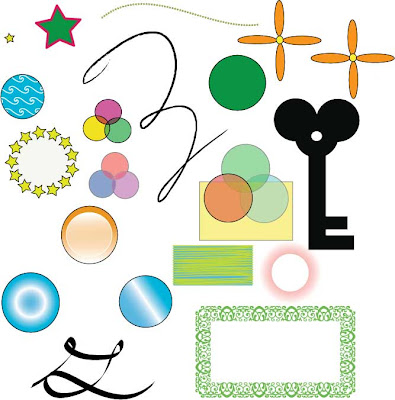
This is the third tutorial I have completed using Adobe Illustrator and my second tutorial completed off of vectordiary.com.  I happen to like vector diary a lot because it provides me with in depth tutorials on the use of the many different tools and functions of Adobe Illustrator.  This week I completed a tutorial that went more into depth on the use of different shape and pattern tools and the effect tools thats can be used on them.
Tools and Skills Learned
  • Brush Stroke- The brush stroke pallet was used to put effects on images such as the script letters and the cirlce of stars.
  • Opacity, Stroke, Gradient, and Transparency- I went more into depth with these tools by using effects such as the radial gradient on the circle, the stroke cap on the star and the transparency effects on the 3 grouped circles.
  • Border Pattern, Pattern Brush and Pattern Fill- I used these tools to create the star outlined circle, the blue pattern filled circle and the green border outline on the rectangle.
Self Reflection

I had a lot of fun working on this tutorial.  Like i said, I enjoy working on the Vector Diary tutorials.  I am becoming more independant with my work and a lot more more farmiliar with the use of Adobe Illustrator.  As I first started working with Illustrator, I did not like it at all.  It is starting to grow on me as we continue to complete more projects and tutorials.  Overall, this tutorial was enjoyable because it went into depth with the more challenging and complex aspects of Illustrator.  I am looking forward to future projects in Adobe Illustrator.

Project/Participation
I felt that i worked hard on this tutorial and the outcome was great!- 10/10

Friday, November 12, 2010

5 Creative Logo Design Sites

http://www.fuelyourcreativity.com/50-kick-ass-logos-for-inspiration/

http://psdcollector.blogspot.com/2010/05/500-creative-clever-cool-logo-designs.html

http://resources.savedelete.com/40-cool-and-colorful-logo-for-design-inspiration.html

http://justcreativedesign.com/2008/02/01/logo-design-process-of-top-graphic-designers/

http://www.davidairey.com/my-logo-design-process/

This is a list of 5 links to some cool and creative logo design sites i've found by popular graphic designers.  I also found a few links to the creative design process that graphic designers use to create their logos.  Looking at these designs is inspiring to me because it shows me what amazing things can be done using the design programs we use in class such as Photoshop and Illustrator.

Adobe Illustrator Spaceship Tutorial

My Spaceship

This is my second completed tutorial using Adobe Illustrator.  The class followed an online tutorial by an experienced illustrator on how to make a cartoon spaceship.  This tutorial can be found on dennisdesign.com.

Tools and Skills Learned
  • Shape Tool- I became more experienced using the shape tools for the body of my spaceship and the stars in the image.
  • Stroke, Gradient, Transparency, and Shading- I used these tools to create the shading, outline, and color gradation of the ship.
  • Pathfinder Tool- The pathfinder tool helped me with subtracting and adding shape areas to create my wings, flame, 
    and window.

Self Reflection

I enjoyed this project much more than the first because it required a little more creativity.  I had fun creating something more complex than just a simple shape  My experience from our first illustrator practice sheet project helped me to complete the spaceship.  My only problem with the spaceship project was that the tutorial was very vague.  Since the tutorial was vague, it forced me to ask questions and become independent and solve my own problems.  Other than that, this project was a lot of fun and has helped improve my skills in Adobe Illustrator!

Participation/ Project- 9/9. I worked hard on this project and the result came out very well.


Friday, October 22, 2010

Adobe Illustrator in 30 days tutorial: Days 1-5

This was my first week using Adobe Illustrator. I've completed one tutorial through the course of this week. I used Illustrator to draw basic images such as circles and squares and more complex images like a clover and a rabbit. This tutorial was done to help familiarize ourselves with Adobe Illustrator and all of its tools and settings. The tutorial I used can be found at vectordiary.com
Tools and Skills Learned
  • Pencil and Pen Tools: I used the pencil and pen to draw the more complex shapes and images.
  • Shape Tools: I used the shape tools to create the simple shapes like the rectangles and circles.
Self Reflection

At first, I did not like Illustrator very much because its very complicated.  I enjoyed our photoshop projects a lot more.  As i progressed in the tutorial, I began to become familiar with the tools being used.  One of my problems was that the tutorial was vague and hard to understand at some times.  This forced me to be independent and attempt things on my own.  Although I didn't enjoy this project very much, it prepared me for future projects in illustrator using the pen and shape tools. 

Participation/ Project- 9/8

Tuesday, September 21, 2010

Blogger

 I would have never thought i would be starting up my own blog in high school.  I had never planned on using a blog up until now.  As a requirement for my graphic design class i have to keep an updated blog for the year.  I live in a small, historical town in the north of New Jersey.  I play baseball and swim and live and ordinary life.  This is my first blog post and I look forward to keeping an interesting blog throughout the year